2011年4月27日星期三

Samsung’s Droid Charge a Strong Second LTE Phone for Verizon

The Samsung Droid Charge, Verizon’s second 4G LTE phone to hit the market, matches up well against the carrier’s first 4G phone—the HTC ThunderBolt—and may be a better choice for some users. The phone has a truly impressive AMOLED display and superfast data speeds, but suffers from a short battery life and a large design that will turn some people off.
The Charge, which goes on sale April 28, costs $300 with a 2-year contract--$50 more than the ThunderBolt--but does come with free mobile hotspot capability “for a limited time” (provided you buy a nationwide calling plan and an unlimited data plan (starting at $30). The Charge’s mobile hotspot can connect up to 10 devices via Wi-fi or five devices via a 3G CDMA connection.

Key Specs
Like the ThunderBolt, the Charge has a 4.3-inch Super AMOLED screen, runs Android 2.2 (Samsung had not comment about why the phone doesn’t’ run the newer Android 2.3 OS), and includes an HTML5 browser. It sports a rear-facing 8-megapixel camera (with flash) and a front-facing 1.3-megapixel camera for video chatting. A 1 GHz Samsung Hummingbird processor (same as Samsung’s Galaxy S phones) sits under the hood—not dual-core, but not slow either.
Design
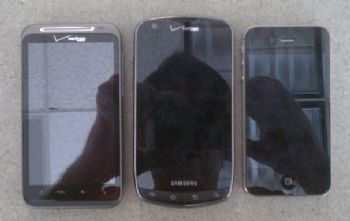

The Charge is noticeably larger than the HTC ThunderBolt (left) and the iPhone 4 (right). The Charge is a largish phone with an oval shape that comes to a soft point at the bottom. It is 5.1 inches long, 2.6 inches wide and .46 inch thick. The Charge is about the same width and depth as the ThunderBolt, but noticeably longer.


The Charge, at just over 5 ounces, is also noticeably lighter than the ThunderBolt’s almost 5.8 ounces, which some will like. Personally I like the weight of the ThunderBolt more; it feels like I’m holding a real piece of gear in my hand.


The Charge, like Samsung’s Galaxy S 4G, has a band of smokey chrome-colored plastic (Samsung calls this “mirror gray”) running around the outside front of the phone, which, to me, creates a cheap-looking effect. Question: Would Apple or HTC ever use such materials on a phone? Answer: Nope.
The functional set-up of the phone is pretty much like other phones in its class. Menu, Home, Back and Search buttons on the front bottom, front-facing camera and ear speaker at the top, earphone jack on the top, volume rocker and mini USB port on the left side edge, power button and HDMI port on the right side edge, camera and flash on the top of the back side, speaker on the bottom back.

Display is a Difference Maker
The literature says that the Charge’s Super AMOLED screen “sets a new standard for brightness, clarity and outdoor visibility.” I selected a movie trailer from the “Media Hub” (Sofia Coppolla’s ‘Somewhere’) to see if that was true. I was impressed—the Charge’s display looks as good or better than that on any other smartphone I’ve seen. The picture I saw did have impressive clarity, and the wide range between the most sunlight-bright whites and the deepest blacks of which the display is capable was immediately apparent. The colors were vibrant and true-to-life without being overbearing. This was a tough part of my testing, because I kept watching the pretty moving pictures, and didn’t want to turn it off.

The fat LTE pipe carrying the video data packets is important here too. The high bandwidth will reduce lost packets to the extent that artifacting, skips, and jitter in the video become very rare. The Charge has the bandwidth to bring in high-definition video streams intact and the AMOLED screen to display the video well. That’s a pretty compelling combination.

As for the “outdoor visibility” claim, I’m a believer here too. I held the Charge and the ThunderBolt side-by-side in direct sunlight, pulled up the phone dialer on each, and saw that the Charge’s screen was indeed easier to see. I could see the ThunderBolt’s dialer, but had to squint a little.

The Overlay
Samsung puts its own TouchWiz interface design over the Android operating system in the Charge and other Samsung phones. This overlay presents to the user all the content (and more) that the normal Android interface does, but the presentation is a little more crowded and noisy. I personally prefer HTC’s Sense UI overlay, which looks more elegant and well-organized to me, but that may be purely a matter of taste.

Camera

I was also moderately impressed with the quality of the 8-megapixel camera on the phone. Viewed on the Charge’s screen the still pictures I shot contained some of the contrast and clarity I saw in the videos I watched. When I viewed the photos on the large screen the high resolution of the shots was apparent. On certain shots (when I held the camera steady) I could detect the kind of fine detail you see in images shot with single-purpose cameras, but rarely in smartphone camera shots (click the zoom image at left). On the downside, the photos seemed to have a bit of a dark cast to them. The photos were not quite as good as ones I’ve shot with my iPhone, but noticeably better than those I’ve shot on my HTC EVO 4G.

The video I shot was less impressive. Viewed on my PC screen, the smallest amount of motion caused the video to blur and wash out. I also saw a lot of correction for light balance going on in the footage. The footage I shot in normal light indoors turned out better, but still not as sharp as I’d hoped. All of the videos looked better viewed on the screen of the Charge than on a full-sized display.
The camera software interface itself was easy to use, for the most part. One function allows you to tap the spot on the screen where you want to the camera to focus, which seemed to help some of my shots. I liked that the camera uses the phone’s volume rocker as its zoom controller, but was disappointed that there was no physical button on the phone to start shooting images or video.

Data Speeds
Testing from my office in the South of Market district of San Francisco I recorded an average download speed of 8.5 mbps and an average upload speed of 3.9 mbps. Running the same test on the HTC ThunderBolt at the same time, I recorded a very similar average download speed—8.25 mbps. (Unfortunately, the FCC cannot accurately record LTE network upload speeds on the ThunderBolt, so that comparison is omitted here.)
Samsung Touch Wiz
The Samsung Touch Wiz UI overlay on the Droid Charge.Shortly after I tested the Charge’s speed, I tested the speed of its mobile hotspot in the same manner. The connected at an average 14 mpbs for downloads and 8 mbps for uploads. Verizon is apparently allocating more bandwidth to the hotspot because it must allocate one pool of bandwidth to multiple devices. The bandwidth allocated to the phone, meanwhile, need only be enough to connect one device.
For comparison, I also ran the speed test on a laptop connected with Verizon’s new Mifi 4G hotspot. The Mifi showed a download speed of 15 mbps and an upload speed of 13.7 mbps. It’s possible that the Charge’s hotspot isn’t quite as fast as Verizon’s single-purpose hotspots, but it’s still plenty fast. Word of warning: cell phone battery life disappears extra fast while the mobile hotspot is on; better to use it when the phone is plugged in, if possible. Which brings us to our next issue.

The Battery Problem
Samsung may have named its phone the “Charge” because that may be the mode the phone spends most of its time in.
The ThunderBolt has already gained a reputation as having a weak battery. The first 4G phone, Sprint’s HTC EVO 4G, suffered from the same problem. The 4G radios in these devices demand far more power than those in 3G phones simply because they pull and push so much more data from and to the network.
Of course I was very curious about the longevity of the Charge’s 1600 maH battery. To test it I streamed a movie in standard definition from a server on the web for four-plus hours, a function that would keep the phone pulling down data from the web continuously, as well as keep the display and speaker operating continuously. I then noted the level of battery depletion, worked out the rate of depletion and finally extrapolated how long the battery would have lasted had the test continued. Since the phone is said to use more juice when the LTE signal is weaker, I tested in place where reception could be called “fair” but not “good.”

Samsung says the Charge’s battery will last “up to 660 minutes,” or 11 hours. (Technically, if the samsung battery lasted only two minutes no one could say that it didn’t last “up to 660 minutes”!) At any rate, our battery test found that the Samsung battery life comes up way short of the 660 minute number—after four hours and 8 minute of continuous video streaming the battery had been depleted to 37 percent of capacity. At that rate, the battery would have expired completely in 393 minutes or 6 hours and 33 minutes.

That’s assuming the battery expires at the same rate when it begins to run out of charge. In my (anecdotal) experience, however, that rate of depletion accelerates. So the 6 hours 33 minutes of battery life may be a little on the generous side.

Still, six and a half hours of continuous use isn’t really too bad. After all, who is going to keep their phone in continuous use for that long during the day? It seems pretty likely that a user could make it through a day without the Charge needed a charge—more than I can say for some 4G phones I’ve used.
And six and a half hours certainly beats the ThunderBolt’s rumored battery life of just 4 hours, if you believe the reports. I ran the same video streaming test on the ThunderBolt. After 4 hours and 3 minutes of streaming, the Thunderbolt still had 40 percent of its battery left. At that rate the htc battery would have completely expired in 405 minutes or 6 hours and 45 minutes. HTC promises only 6 hours and 18 minutes of usage time for the ThunderBolt.

Call Quality
To test the voice quality I placed some calls to land lines from a quiet spot, then from beside a busy street in San Francisco. The person I called said they could hear me very clearly but that my voice sounded like “radio voice”—that is, very present but without much body. I heard the same thing coming through the ear speaker on the Charge; the voice was clear but didn’t sound exactly human, as it does on the iPhone 4.
When I called my friend from beside the busy street, I learned two things: the ear speaker was loud enough for me to hear my friend’s voice clearly, without even turning the volume all the way up. Most importantly, my friend said that the traffic noise I could hear so clearly on my end sounded no louder than a dull background noise on his end. The noise cancellation in the Charge must be of fairly high quality.

Bottom Line
Samsung’s Droid Charge is a strong second LTE phone for Verizon, especially for people who like to stream high-quality video, video chat or play web-based games. The combination of the impressive AMOLED stream and the fat LTE pipe to carry loads of high-quality media down to the phone is a powerful combination. If you can deal with the not-so-impressive smartphone battery life, Samsung’s somewhat cluttered user interface and the general biggishness of the phone, the Charge might be a good phone for you
Since the Charge is the second LTE phone to hit the market in the US, it must be measured against the first LTE phone, the ThunderBolt. And here the Charge comes up short. While the ThunderBolt’s display may not looke quite as beautiful as the Charge’s, its connection speeds are the same or a little better, its battery is a little better, its physical design is smaller and more elegant, and its user interface is a more ordered, pleasing environment to work in. In short, if I were choosing between the two Verizon LTE phones, I could choose the one that’s $50 less, and still walk out with the better of the two phones.

2011年4月20日星期三

Picking Out a Laptop in the Brave, New World of Tablets

It is too soon to replace my twice-yearly laptop buyer's guides with tablet buyer's guides, but some days it feels like I should. Much of the energy that companies once poured into laptop designs and advances seems to have been drained off into a massive race to create tablet computers.

Still, while tablets are important, they don't fully replace laptops, at least not yet. There remains huge value in the portable, clamshell-shaped computer with a physical keyboard, lots of ports, plenty of storage and more horsepower than tablets offer. So, here is my annual spring laptop buyers' guide, a basic cheat sheet to the most important factors in the shopping process.

While I've focused on laptops, much of this advice also applies to desktop computers, a fading species. As always, these tips are for average consumers doing the most common tasks. This advice doesn't apply to businesses or to hard-core gamers or serious media producers.

The first thing to consider is that you may want to wait to replace your laptop. Apple's iPad, and the tablets coming in its wake, have put the computer industry in reset mode. If you own a tablet, you are likely to rely on your laptop less often, extending its useful life. And if you don't, you'll probably find over the next year or two that more interesting choices will appear as companies try to bring tablet qualities to laptops and laptop features to tablets.

Some early inklings: Apple's MacBook Air and the Windows-based Samsung Series 9 start almost instantly, like tablets, and use chips for file storage, like tablets do, instead of hard disks. Also, Apple will soon roll out a new Macintosh operating system, called Lion, that displays programs as if they were tablet apps, and it already has an iPad-like app store for the Mac. Microsoft is working on a version of Windows, likely to appear next year, that fuses tablet and PC concepts. This software will run on some current computers, but new hardware, more tailored to these systems, will be coming.

As for tablets, some companies are working on designs that go beyond the iPad template to somehow integrate physical keyboards and traditional ports. This would certainly blur the lines and make for new, intriguing choices if you wait.

Laptop shoppers now need to consider if a tablet will suffice—especially if they are looking for a highly portable, secondary machine, as I noted in my last guide. The new iPad 2, which still starts at $499, has at least twice the horsepower of the original model, and now boasts 65,000 tablet-optimized apps. It is gradually morphing into a productivity platform—able, for instance, to edit videos. And it has now been joined by similarly powerful competitors running a new tablet version of Google's Android operating system and by the $499 PlayBook, the first tablet from Research in Motion, which boasts speedy hardware and a new operating system. Hewlett-Packard's new tablet, based on Palm technology, is coming soon.
Tablets tend to beat small, low-cost laptops in weight, start-up speed and battery life. And they are competitive for lots of common tasks, such as Web browsing, email, social networking, and viewing or playing documents, photos, videos and music.

But laptops still win for intensive work like creating long documents, or doing anything that requires precision and benefits from a physical keyboard. They also are more compatible with printers and external disks.
If you can't wait, or don't want a tablet, you'll find relatively little has changed in laptop-land in the past six months or so. Here's a rundown of what you should look for in a laptop.

As always, capable Windows 7 laptops cost less and offer much more variety than Mac laptops. The latter start at $999, while a few basic, full-size Windows machines can be had for $300 and the decently equipped Windows models are in the $500-to-$800 range. And Apple refuses to make tiny netbooks, leaving that dwindling category to the Windows guys. But Apple laptops combine sleekness, durability and strong dell battery life with well-regarded customer service. Macs can run Windows, at extra cost, if you need to use a program that is Windows-only, and they come with better built-in software. Finally, Mac users generally needn't worry about malicious software, since it's nearly all designed to run on Windows.
Memory
I recommend 4 gigabytes of memory, or RAM, on a new Windows computer, though a Mac will perform well on 2 gigabytes, unless you're designing complex graphics. A new Windows machine should be labeled "64-bit" for best performance.
Processors
The newest, and most advertised, chips in consumer laptops are Intel's i3, i5, and i7 Core models. But a PC with chips from rival AMD, which usually cost less, or older Intel dual-core chips, will do fine for most users.
Graphics
Pay attention to this, even if you aren't big into video or games. Many computers offload nongraphics tasks to potent graphics chips for speedier operation.
In general, less-expensive machines have wimpier graphics hardware, and costlier ones have more-powerful graphics. Some have both and can switch between the two as needed.
Hard Disks
A 320 gigabyte hard disk should be the minimum on most PCs, though 250 gigabytes are fine for many average users. Solid-state disks, which lack moving parts and use flash memory, are costlier but faster and use less power. However, they usually have less capacity. As more data are stored online, huge amounts of local storage will be less crucial.
Ports
Many PCs now come with a port called HDMI, which makes linking to a high-definition TV easy. There is a new, much faster USB port, called USB 3.0, but so far, few peripheral devices can use it. And Apple has introduced yet another high-speed connector that has little practical use so far, called Thunderbolt.
Again, with the industry in flux and tablets on the rise, if you can wait to buy a laptop(laptop battery), do so. But if you must take the plunge, don't buy more laptop than you need.

2011年4月18日星期一

A New AMD Brazos Fusion Acer Laptop Is On The Way, 7 hours battery life

Acer Aspire One 722

Acer(acer battery) has a nice diverse selection of AMD Brazos Fusion APU (Accelerated Processing Unit) powered machines at the moment. They have 10.1-inch Acer Aspire One 522 ($324.99), a 15.6-inch Acer Aspire 5253 ($384.99) and soon they will have an 11.6-inch model to team named Acer Aspire One 722.

Acer Aspire One 722 lid design

The Acer Aspire One 722 is reported by Macles as featuring shared features with the 522 and a design that is shared with another netbook named Acer Aspire One D257. For the Fusion side of things the 722 will feature the 1.0GHz dual-core AMD C-50 APU (Ontario family) which is paired with AMD Radeon HD 6250 discrete-class graphics.

The only real difference the 722 has with the 522 netbook which share the same design and APU is in the display size and resolution. According to Macles the 722 will come with an 11.6-inch WXGA (1366×768) resolution LCD. Also acer extensa 5220 battery life is supposed to be rated at max. 7 hours for the 722 while the 522 is rated at max. 6 hours with standard acer aspire 5920 battery.

Acer Aspire One 722 keyboard and touchpad

We will have to play the waiting game for info on pricing and launch on this ultra-portable laptop. Acer hasn’t announced it yet but Macles is a reliable source when it comes to Acer netbook/ultra-portable laptop news.

Li-ion, 11.1V, 4400mAh ACER Aspire 5536 Laptop Battery.
Battery Volt: 11.1V
Battery Capacity: 4400mAh
Battery Weight: 453.6g 
Battery Color: black
Battery Size: 208.20 x44.94 x19.90mm
Product Code: NAC029 
Sale price: AU $73.49

2011年4月14日星期四

Laptop Battery Review : Dell & HP & Lenovo not green enough

The NGO praised Apple and Acer for being the only ones firmly committed to phase out these substances. Apple has already met its commitment to have all of its products free of PVC and BFRs by the end of 2008. This is with one exception, which is a technical challenge: getting certified PVC-free power cords.

To their credit, Dell NT379 and Lenovo have both been at work. Dell JD634 has a desktop, Cheap asus a6000 battery a notebook, and several models of monitors that have a reduced use of PVC and BFRs, and a few monitor models that are free from these substances. Lenovo also has two models available that are PVC- and BFR-free. HP is the one that trails farthest behind and has yet to bring out any models with even a reduced use of PVC and BFRs.

The toxic substances in question include vinyl plastic (widely known as PVC) and brominated flame retardants (BFRs). Lenovo has delayed its deadline by one year, while HP and Dell 312-0383 have yet to set a new timeline.

Other than PC (and Mac) makers, the Greenpeace guide also mentions other electronic vendors.  The biggest change in the rankings is the big jump from the 15th to the 4th place made by Philips. The company has significantly improved its position on taking financial responsibility for the recycling of its own e-waste, although it still needs to implement a system to put this into effect. Struggling with the economic downturn, the biggest names in PC makers seem to lag on staying clean.

Apple is not exactly a PC maker, it’s a Mac maker, which produces fewer products than the other three companies. high quality battery , However, this only means it’s even more important that the other three stay committed.

In the March issue of the Guide to Greener Electronics, released Tuesday, Greenpeace decided to knock a point off of Dell 451-10298 ’s, HP’s, and

Lenovo’s green scores for procrastinating their commitment to eliminate toxic substances from their products by the end of 2009. Dell 312-0653 has also been providing free recycling for its products for a long time by teaming up with Staples. Maybe for this reason, it’s still the greenest guy among the not-so-green list of companies.

To Greenpeace, Apple is now the example for other PC makers to follow. “If Apple can find the solutions, there should be no reason why the other leading PC companies cannot,” said Casey Harrell, Greenpeace International toxics campaigner. “All of them should have at least one toxic-free line of products on the market by the end of this year.”

Throw in the recent arrival of netbook leader Acer — and Palm’s PDA-pioneer cred and buzzworthy upcoming Palm Pre — and you’ve got a competitive landscape with little elbow room left.

If it wants in on smartphones, Dell 310-9080 will have to reach beyond its comfort zone. Since Research In Motion has the corporate market covered, it has to compete in retail, where it just hasn’t been a very vocal participant in the past. In the smartphone market, Palm would give Dell  e1505 a household brand and street cred with both companies and consumers. Palm is attainable.

In an ideal world, Dell would get cozy with Research In Motion. Unfortunately, the BlackBerry maker commands a billion valuation, toshiba battery despite trading at a third of last year’s high. Palm comes laden with warts, but it also comes priced at an enterprise value just less than .7 billion.


Apple may pose legal challenges. Palm has endured seven consecutive periods of quarterly losses, atop negative shareholder equity and more debt than cash on its balance sheet. Even a great device can flop with the wrong marketing campaign. Palm could use Dell Precision M2300 ’s billions to protect and market the Pre. Dell also has an enviable list of big-time customers, making it easier to sell massive quantities of smartphones to a company by bundling them with a large computing hardware order.

Palm will also get more expensive if Microsoft (Nasdaq: MSFT) lives up to the old rumor that it’s interested in buying Research In Motion below a share. Consolidation in the smartphone industry would quickly drive up prices for any remaining stand-alone companies, and Dell  640m doesn’t want to overpay just because it was late to the buyout binge.

We can’t all be Apple.
Dell has fallen flat whenever it strays too far from its bread-and-butter computing hardware roots. Whether we’re talking about Dell-branded televisions or the dirge-inspiring DJ Ditty MP3 players, apple A1175 battery,  the company’s graveyard of failed products is a constant reminder of its limited range.


It’s been a little more than a week since industry-watchers at Dow Jones, Reuters, and ComputerWorld pondered the two companies’ potential nuptials. Dell would love a little skin in the smartphone market. Palm would love a sugar daddy to help it escape from its financial straitjacket.

Dell has no business jumping into the crowded smartphone market alone.
How dumb do you have to be to introduce a new smartphone these days?  The market already has Research In Motion’s (Nasdaq: RIMM) e-mail-centric BlackBerry, Apple’s (Nasdaq: AAPL) trendy iPhone, and the open-ended nature of devices powered by Google’s (Nasdaq: GOOG) Android platform.

Palm shares have taken off since the hype began building for its Pre device in January, but Dell Latitude D620 still has the greenbacks to reward Palm investors, even if they demand a steep premium to cash out. Dell will have to pay now, or pay more later.

Dell can’t just afford to sit this out. If the Pre is a runaway hit, Palm will be off to the races. If not, Palm may get cheaper, but its grasp on the market will get pounded once again.

“Dell’s Smartphone: Dead on Arrival” was my headline when The Wall Street Journal exposed the computer dell inspiron 9400 battery maker’s plans to dive into the high-end handset market two months ago. My opinion hasn’t changed. Buying Palm would help on both fronts, since Dell would be acquiring an established name and also eliminating a potential threat.

Dell closed out the year with .1 billion in cash and short-term investments. In other words, it can afford to get the deal done without making much of a dent in its massive vault.

Some buyout rumors sound so logical that only pride, ignorance, and incompetence could get in their way. I guess that’s why the rumors that Dell (Nasdaq: DELL) might snap up Palm (Nasdaq: PALM) will probably never come to pass.

Dell’s hardly alone in the boneyard. Hewlett-Packard’s (NYSE: HPQ) meandering iPaq is proof that only Apple has the panache points and premium positioning to make a difference in telecommunications as a computer company.

With Palm all but gambling the future of its company on the Pre’s success,  there’s really no better time for Dell to make a Pre-emptive strike.

That said, Dell’s had far greater success on the rare occasions when it buys out other companies — as with Alienware, a high-end computer maker for diehard gamers, three years ago.

2011年4月10日星期日

HTC Desire HD: Review

The Desire HD is Taiwanese corporation HTC’s current top dog, and it shows. With a screen size that’s out of this world, gorgeous graphics, large speakers and a fast CPU, this is a mobile phone which has some serious props. But in a market which is about to be saturated with similar devices from HTC’s rivals Samsung, Sony Ericsson, LG and Motorola, can the Desire HD continue to hold its own?

Design
With its 4.3” capacitive touchscreen running at a resolution of 480×800, the Desire HD feels in the hand like a mobile phone that has dreams of being a small tablet. Its display is bigger than that of the
original Desire (at 3.7”) and the iPhone 4 (at 3.5”). Your writer has large hands, but it’s a little difficult to hold the phone flat in one hand without stretching the tendons a bit.
As the phone faces you, above the screen is a horizontal speaker grill line, which — like the screen — is larger than we have seen on other phones. Undoubtedly it helps contribute to the HD’s stellar audio
quality. The phone boasts Dolby Mobile and SRS virtual surround sound.
On the bottom of the screen are the usual four standard buttons which most phones based on Google’s Android operating system use — home, menu, return and search. However, unlike the physical buttons on the original Desire, the Desire HD’s buttons are touch-sensitive. You don’t press them in — you just touch them. It’s an effect we’ve grown to love while testing the handset, and we’d find it hard to go back to physical buttons now.
On the left-hand side of the phone are volume buttons, which emit cute ‘pink, ponk’ sounds when pressed, and on the top is the standard on/off/sleep button. There is nothing at all on the phone’s right-hand side, and on the bottom the options are similarly minimised — just a 3.5mm audio jack and a micro-USB port for charging and connecting the phone to a PC.
On the back of the phone you can find its (very large) camera and flash, as well as another audio grill. This area is also where we fell in love with the Desire HD’s case. The aluminium unibody, combined with plastic inserts which allow access to the SIM card, MicroSD and battery slots, is just fantastic on the fingers and — wonder of wonders — doesn’t hold fingerprints. It also grips fairly well, meaning that it will likely be hard to drop the device. And the actual material looks quite futuristic — part metal, part plastic, and all class.
Overall the Desire HD’s design is stellar, although a bit big for small hands.
Features
If you can name the features that you want in a high-end Android handset, odds are the Desire HD has them.
The phone comes with version 2.2 of the Android operating system (Froyo), although we’re sure it wouldn’t be too hard to upgrade it to 2.3 (Gingerbread), and the 1GHz Qualcomm CPU can definitely handle any current or future needs. The device has 768MB of RAM and 1.5GB of flash storage on-board. In addition, you can add a microSD card with up to 32GB of storage to help you cart around your complete music library.
The included camera is a 8 megapixel monster with dual LED flash and autofocus, and the Desire HD will happily interface with the network of your choice, with support for all of Australia’s popular mobile
phone networks; although the phone exclusively sells in Australia through Vodafone (which doesn’t have the greatest network performance in the world), you can get an unlocked version through online retailers like Mobicity and use with your Telstra or Optus SIM. Then there’s a heap of extras … a FM radio tuner, A-GPS support and so on — and all of this is packed into a package which weighs just 164 grams. Pretty phenomenal stuff.
Increasingly, mobile phones are becoming like laptops. Many are based on the same CPU or similar CPUs or chipsets, but the vendors can innovate through little things like better sound, innovative form factors, larger and brighter screens and so on. When seen in this light, most of HTC’s current models, including the Desire HD, are up to the fundamental spec the modern smartphone user needs. But the Desire HD just seems to kick things up a notch higher.
Performance
If you really want to see the power of Google’s Android platform in action, pick up a Desire HD and spend some time with it. You probably won’t want to go back to Apple’s iOS afterwards.
The Desire HD is one of the first Android phones we’ve seen where the power of the phone’s hardware matches the power of its software. Menus snap into place, everything you click loads instantly, swiping has satisfying little bouncing animations that don’t lose frames even when the constantly moving and changing HTC desktop background is shifting around simultaneously. This is how Android ought to be.
Video played online and from the device itself played fine without any delays or jittering, and we watched half an hour of a StarCraft II match on YouTube before we realised we had gotten that far into it. This is truly a screen which you can consume some serious multimedia on.
One area which should be particularly singled out for praise is the Desire HD’s camera. A lot has been said about the iPhone 4’s stellar photography capabilities, but the Desire HD would definitely give the Apple camp a run for its money — the handset is great for taking both stills as well as 720p videos.
However, as with all products, there were some caveats to the Desire HD’s performance.
For starters, we found it a little weird when watching video that much of the audio seemed to be directed away from the viewer, emanating out of the Desire HD’s rear speaker instead of the front one. We’re not sure if this was just the fault of the videos we were watching (standard YouTube, mainly), but much of the audio seemed to end up being directed in the opposite direction to our ears.
Secondly, the Desire HD’s battery life is not spectacular. We tended to pick it up and tinker with it for a while, then leave it on our desk for half a day or so, then tinker some more — and even this
light use left the handset beeping for a power refresh after only a couple of days. We don’t need to charge our current main handset, an iPhone 4, more than once or sometimes twice a week, if we’re using it heavily, but it’s easy to envisage a situation where the Desire HD would need to be charged almost every day.
Most Android handset vendors like to customise their software interface a little for the end user, and HTC is no exception to this rule, with its Sense interface dominating the experience for the end
user on its Desire range. In addition, the company has implemented an online service — HTCSense.com — which allows users to back up their data online, make the phone ring if it’s lost, or even erase data remotely if they believe it has been stolen.
While many of these features are fantastic additions to the Android experience, seeing them as vendor-specific add-ons smacks a bit of lock-in to us. We’d like to see them become more generic Android features through Google, so that customers don’t lose software functionality when sticking with the Android platform but changing phone hardware vendors.
Conclusion
There is no doubt that the HTC Desire HD is about to face some stiff competition in the Australian market for smartphones. The Sony Ericsson Xperia Arc, the Motorola Atrix and the Samsung Galaxy S II are all expected to hit Australia shortly, and Apple’s iPhone 4 is also believed to have been selling well since it launched locally in mid-2010.
However, there is no doubt that the Desire HD has a featureset and design which makes it a strong competitor to all of these high-end handsets. And to boot, it’s been available for some time already in
Australia; the possibility exists that its price will come down a little when the competition gets fierce.
With its powerful CPU, massive screen size, top-end amount of RAM and a major manufacturer behind it, the Desire HD is a future-proof phone. As Android marches on, expect to see its functionality extended through software upgrades. If you can stand the toshiba battery life and have big enough hands, this is a handset worth investing in.

Rebuilding a Sony Vaio Battery

Recently the battery in my aging laptop (Sony Vaio VGN-NR498E) took a nose dive.  This is to be expected after 4 years or so, so I was not too upset about it.  What I am upset about, is the fact that Sony doesn’t seem to sell a genuine replacement for the battery.  The original is a VGP-BPS9/B and the only “Sony” batteries I found online were from unreputable sources and cost around $150.  I decided to take the battery apart and see if I could replace the cells directly, but in the process I had to break most of the battery connections and it did not seem trivial to replace them.  After whining about it for a week I opted to buy a third party battery off buy for $59.
Battery Shipment Contents
I received the shipment within 5 days and inside I found the battery, a couple pages of instructions and a mini CD.  There was also a written warning in poorly translated English stating that I needed to update the BIOS in order to use the sony battery.  It was so poorly translated that I couldn’t even get a loose interpretation of some of the text.  For example, “You’re system may isn’t suitable for this software or has already not renewed at first the bios file of factory”  (side note: is it really that hard to get a fluent English-speaker to proof read your instructions?).  Anyway, the instructions suggested that I may damage the battery and/or system if I didn’t update my BIOS before plugging in the battery, so I popped in the CD which presumably contained the update.  The CD was blank.  I ended up finding the necessary software on a site mentioned in their instructions, but the software gave me a vague warning that my BIOS was not supported and even after I forced the update the software crashed.  At this point I gave up on bricking my laptop via a failed BIOS update and opted to plug it in and hope for the best.  The battery showed about a 40% charge but the laptop said it was not charging it (I don’t haveSony’s anti third-party battery software installed).  After much frustration and trying different combinations of removing and replacing the battery at different times, I decided to take the Steve approach and hack it :) .
Original Sony battery (top) and replacement (bottom)
I had already taken my original battery apart and thrown the dead cells away, so I don’t have any pictures of it, but it looked almost exactly the same as the replacement: 6x 3.6V battery cells and a controller card.  Batteries are nothing but a means of storing power, so the controller must be responsible for communicating things like battery capacity and charging status.  I decided to transplant the new battery cells onto the old Sony controller and give it a shot; in short, it worked!  Here’s the process in pictures.

Step 1: Take batteries apart – remove 4 screws and pry top cover off, then gently pry out the batteries and controller card.

Replacement Battery

Step 2: Remove the controller card from the batteries by desoldering the four metal tabs that connect to the different battery junctions.  I used desoldering wick, flux and a hot soldering iron.

A closeup of the new controller (attached), and the original Sony controller next to it.

Step 3: Solder the battery leads to the new controller.

Solder Sony Controller
Finished Controller

Step 4: Reassemble the battery and secure it with some hot glue.

Glue the Batteries and Controller
Finished Battery

Step 5: Once the top cover is replaced, put the battery back in the computer – you’re done!

For best results you will also need to recalibrate the battery by letting it charge completely, then unplugging the power cable and let the battery discharge until it’s completely dead.  I let my new battery charge overnight, then discharged it in the morning.  Incredibly, the new battery kept the laptop alive for over 3 hours – a significant improvement over the 5-10 minutes I was getting before!
If you are going to attempt this, you should know that there is a very real possibility that things could go horribly wrong if, for example, you wired the battery pack in backwards.  You could destroy the charging circuit in your laptop or even melt it down into a heap of plastic and potentially burn down your house in the process.  That having been said, if you know what you’re doing, this is a great way to recover an investment in a low-grade battery!

2011年4月7日星期四

Lenovo laptop buying guide

If you're in the market for a Lenovo laptop, you need to know which model will best suit your needs. Lenovo has three different laptop ranges: ThinkPad, IdeaPad and Essential. There are different series available within these ranges, so it's not a clear-cut choice as to which might be right for you. In this guide we will go through all of the options available in Lenovo's ThinkPad, IdeaPad and Essential G series so that you know which laptops(laptop battery) are suitable for serious work, play, entertainment, or all of the above.

Lenovo ThinkPad


ThinkPad laptops are Lenovo's professional-grade models. They are known for their business-like good looks, strong build quality and reliability. They are designed to appeal to professional users who want a no-fuss laptop computer that can be used for crunching numbers, word processing, creating presentations, displaying multimedia files and much more. ThinkPad laptops have undergone only slight modifications over the years — some have almost the same styling they had 10 years ago — but the range has been expanded to cater to users who want a small, basic computer, right up to users who want a high-end machine for the ultimate in processing performance. Here are the different ThinkPad ranges that are available in Australia.

ThinkPad Edge: The ThinkPad Edge is the most basic of the ThinkPad models, and it's designed for small business users who want something inexpensive, yet stylish and capable of running office programs comfortably. It's available in 14in and 15in sizes and with Intel Core i3 or Core i5 CPUs. Like all ThinkPads, it has dual pointing devices (a TrackPoint and a touchpad). Pricing starts from $649.
Thinkpad L: For business users who want a simple yet serious laptop for running an office suite and using the Internet, the ThinkPad L Series should be enticing. It makes use of Intel Core i3 or Core i5 CPUs and is available in 14in or 15in sizes. Lenovo claims that it also contains more post-consumer recycled content than any laptop in the world (post-consumer recycled content includes items such as used paper and cardboard, aluminium cans and plastics). Pricing starts from $729.
ThinkPad T: The ThinkPad T Series is tailored for corporate users who want a well-built and comfortable laptop with a long battery life. ThinkPad T notebooks feature Intel's Core i5 or Core i7 CPUs, so they're very powerful, and they have all the features that have made ThinkPads famous, such as dual-pointing devices, a matte screen and a screen-mounted keyboard light. T Series notebooks have a sturdy built quality that includes metal hinges. Pricing starts from $1799. Back in 2009, a ThinkPad T Series notebook was the first ever notebook to receive a 5-star rating from the PC World Test Centre.
ThinkPad W: Professional users who want the ultimate in computing performance should find the ThinkPad W Series appealing. The ThinkPad W Series consists of a 15in mobile workstation that can be configured with either an Intel Core i5 or Intel Core i7 CPU, and it ships with professional-grade graphics solutions (such as the NVIDIA Quadro). The W Series is perfect for designers and engineers who need to take a powerful computer with them between home, work, and on-site locations. Pricing starts from $3099.
ThinkPad X: With a thin frame, a light weight and long battery life, the Lenovo ThinkPad X Series is designed for executives, or indeed anyone, who want a very mobile notebook that has very good specifications. The X Series comes with a 12in screen and it's available with either an Intel Core i5 or a Core i7 CPU. Pricing for an X Series ThinkPad starts from $1879. Those of you who want a tablet-convertible notebook will also want to look at the ThinkPad X Series — models with touchscreens are available and start from $2699.

Lenovo IdeaPad


The IdeaPad represents Lenovo's lifestyle selection of notebooks, which means they are tailored to offer home entertainment features and swift performance that home users and students can take advantage of. IdeaPad notebooks have a lot more flair than their ThinkPad stablemates; they have more curves, a glossy finish and they can even sport patterned lids, which will really make you stand out from the crowd. There are three series of IdeaPad laptops: S Series, Y Series and Z Series.
IdeaPad S Series: The S Series is Lenovo's netbook offering. It's a 10in laptop that sports Intel Atom CPU technology and it's suited to basic tasks such as Web browsing, media consumption and document creation. Pricing starts at around $399.
IdeaPad Y Series: The Y Series is designed for home users and students who have a creative side and an appetite for entertainment. It features a 15in screen, glossy styling, a two-tone colour scheme and it's fast! It can be configured with a high-end Intel Core i7 CPU and an AMD Radeon graphics card, which allow the Y Series to be used for video encoding, video editing, watching Blu-ray movies, gaming and many other multimedia tasks. Pricing for a Y Series laptop starts at around $1099 depending on the configuration.
IdeaPad Z Series: The Z Series is also designed for multimedia pursuits, such as watching videos and editing photos, but it's not as powerful as the Y Series so it can be found at more affordable prices. It's available with Intel Core i5 CPUs and pricing start at around $799.

Essential G Series


The Lenovo Essential G Series of laptops(computer battery) are similar to the IdeaPad in size and design and they are suitable for home users and students looking for a bargain. They are useful for everyday computing and multimedia work, and depending on the configuration, you could even use them for taxing tasks such as video and photo editing. Essential G Series laptops have a 15in screen and can be configured with Intel Core i3 or Core i5 CPUs and pricing starts from $829.